
Power & Speed: Choosing the Right AI Model
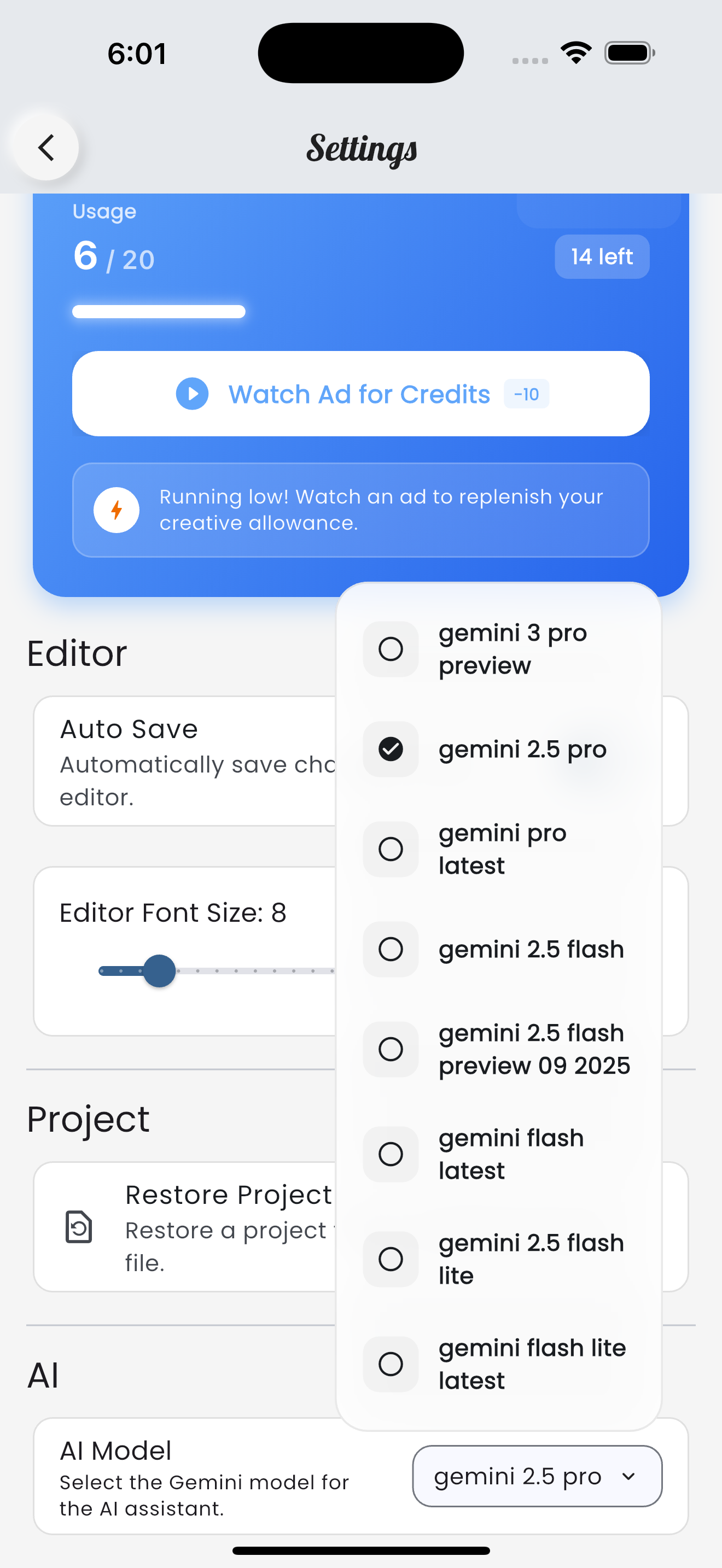
Web IDE integrates the latest Gemini models to power your development workflow. We understand that one size doesn't fit all—sometimes you need deep reasoning for complex architecture, and other times you just need a quick syntax fix. We've updated our settings to give you full control.
Available AI Models
You can now choose from a suite of models in the settings to match your specific needs:
- Gemini 3 Pro Preview: The cutting-edge model with advanced reasoning capabilities. Ideal for complex debugging, logic generation, and architectural advice.
- Gemini 2.5 Pro: A robust powerhouse balancing high intelligence with stable performance.
- Gemini 2.5 Flash & Flash Preview: Optimized for speed and low latency. Great for quick code completions, explaining snippets, and rapid iteration.
- Gemini 2.5 Flash Lite: The lightweight champion. Ultra-fast and efficient for smaller tasks where speed is the priority.
How to Switch Models
Changing your AI engine is simple:
- Go to Settings from the home screen sidebar or the gear icon.
- Scroll down to the AI section.
- Tap the AI Model dropdown to see the list of available engines.
- Select the model that best fits your current task.
Safety Nets: Auto AI Fallback
We know reliability is key when you're in the flow. We've introduced an Auto AI Fallback toggle. When enabled, if your selected high-performance model (like Pro) is overloaded or experiencing downtime, the app automatically switches to Gemini 2.5 Flash Lite.
This ensures you always get a response, keeping your workflow uninterrupted even during peak usage times.
Understanding Gemini Lite Capacity
While models like Gemini Flash Lite are incredibly fast, they utilize a smaller context window to achieve that speed. As noted in the app:
"Gemini Lite models changes may not take effect on heavy projects."
If you have a large project with many files attached, the Lite model might not process all the context effectively. For heavy lifting, deep refactoring, or projects with extensive file structures, we recommend sticking to Gemini 3 Pro or Gemini 2.5 Pro to ensure the AI sees the full picture.